数据挖掘与R语言

第8讲:数据可视化 ~ Part 2

2026年04月22日

上讲回顾

  • 为什么可视化:Anscombe 四重奏——相同统计量,截然不同的数据结构;可视化是分析本身,不是装饰
  • base R 作图plot()hist()barplot()boxplot() 快速探索,无需加载包
  • ggplot2 语法逻辑:数据 + aes() 映射 + geom_*() = 一张图;图层用 + 叠加
  • 分类变量geom_bar()(自动计数)/ geom_col()(已有计数);reorder() 排序;position 控制分组方式
  • 数值变量geom_histogram()(分布)、geom_density()(平滑曲线)、geom_boxplot()(五数概括)
  • 双变量关系:散点图 + 趋势线、geom_jitter() 处理重叠、小提琴图叠加箱线图
  • 多变量初探:颜色/形状/大小映射、facet_wrap() 单变量分面、facet_grid() 双变量矩阵分面

本讲内容

  • Part 1:坐标轴调节 ——scale_x/y_continuous()
  • Part 2:分面进阶 ——facet_wrap()
  • Part 3:多图并列 ——patchwork
  • Part 4:配色系统 ——scale_color_*() / scale_fill_*()
  • Part 5:图形保存 ——ggsave()

ggplot 绘图步骤

第一步:创建空白画布

你什么也看不见,但你已经创建了一个空白画布

▶️ 查看代码
penguins |> 
  ggplot()

映射数据:对哪个或哪些数据作图

告诉它对哪个或哪些数据绘图,该参数始终在aes()函数中定义
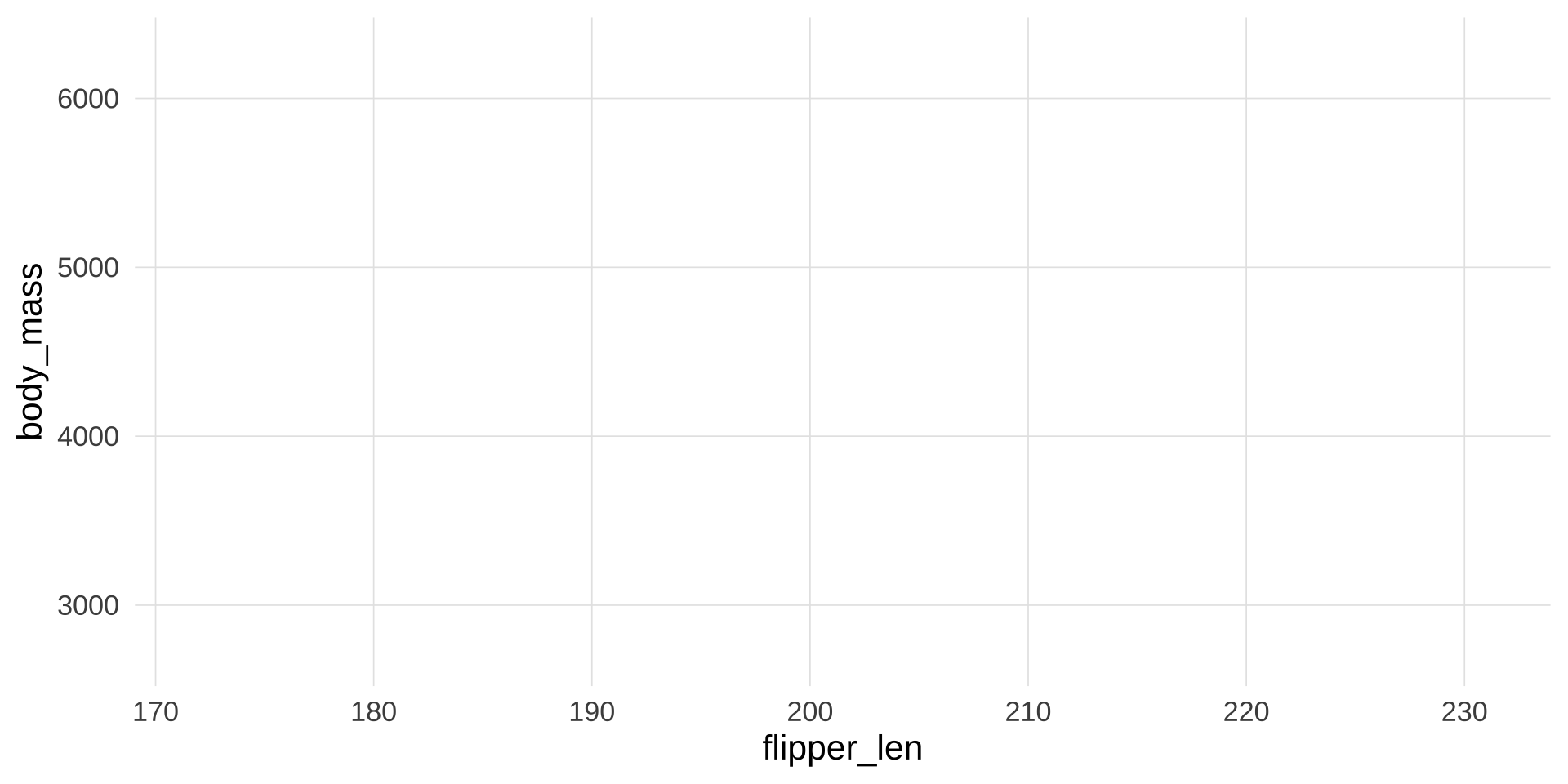
▶️ 查看代码
penguins |> 
  ggplot(aes(x = flipper_len, 
             y = body_mass))

还是没有图,但我们已经生成了相应的刻度。

绘什么形状或类型的图:geom_

  • 柱状图:geom_bar()
  • 折线图: geom_line()
  • 直方图:geom_histogram()
  • 箱型图:geom_boxplot()
  • 散点图:geom_point()

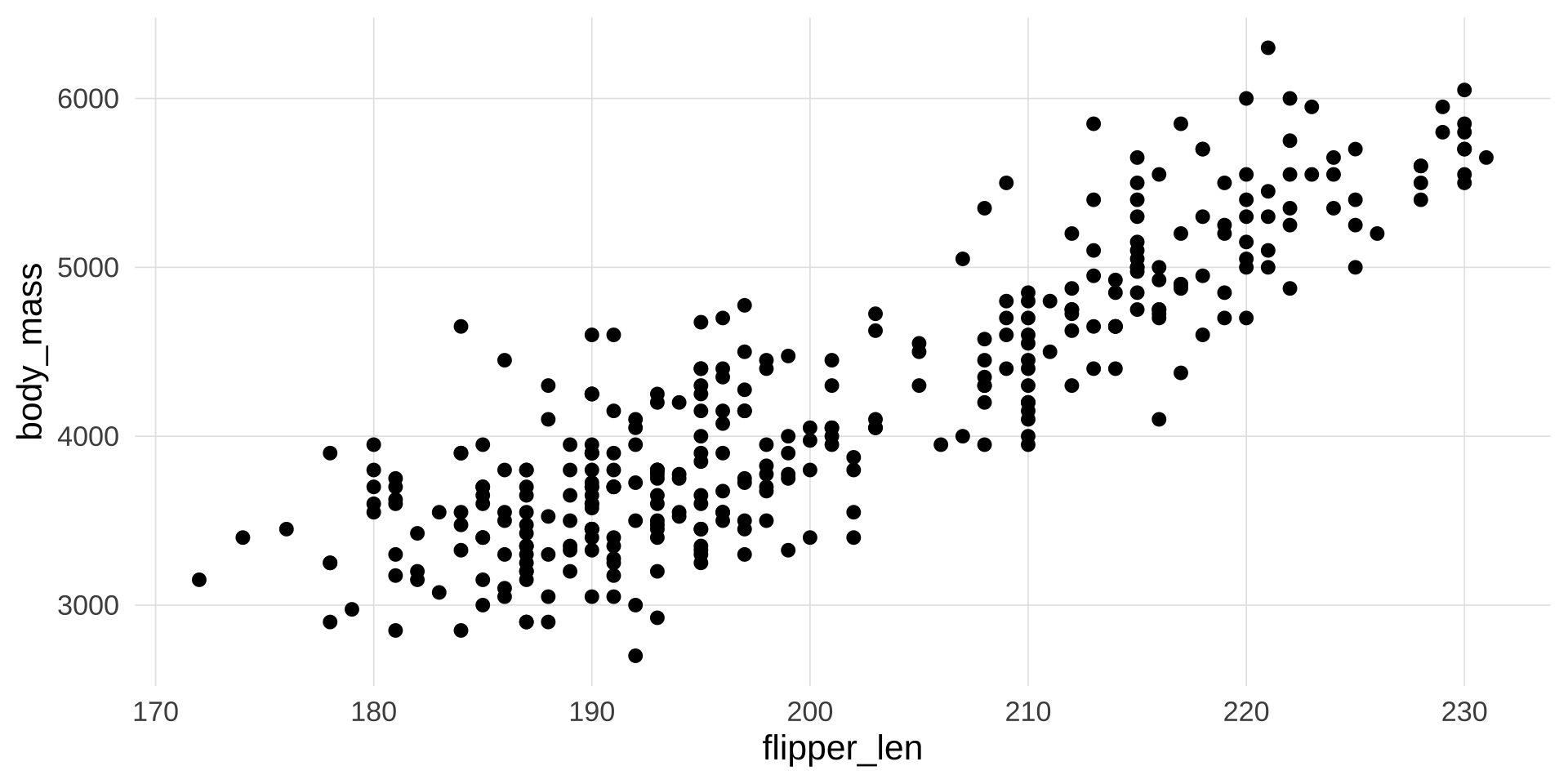
这里我们绘制最基本最常用的散点图

▶️ 查看代码
penguins |> 
  ggplot(aes(x = flipper_len, 
             y = body_mass)) +
  geom_point()

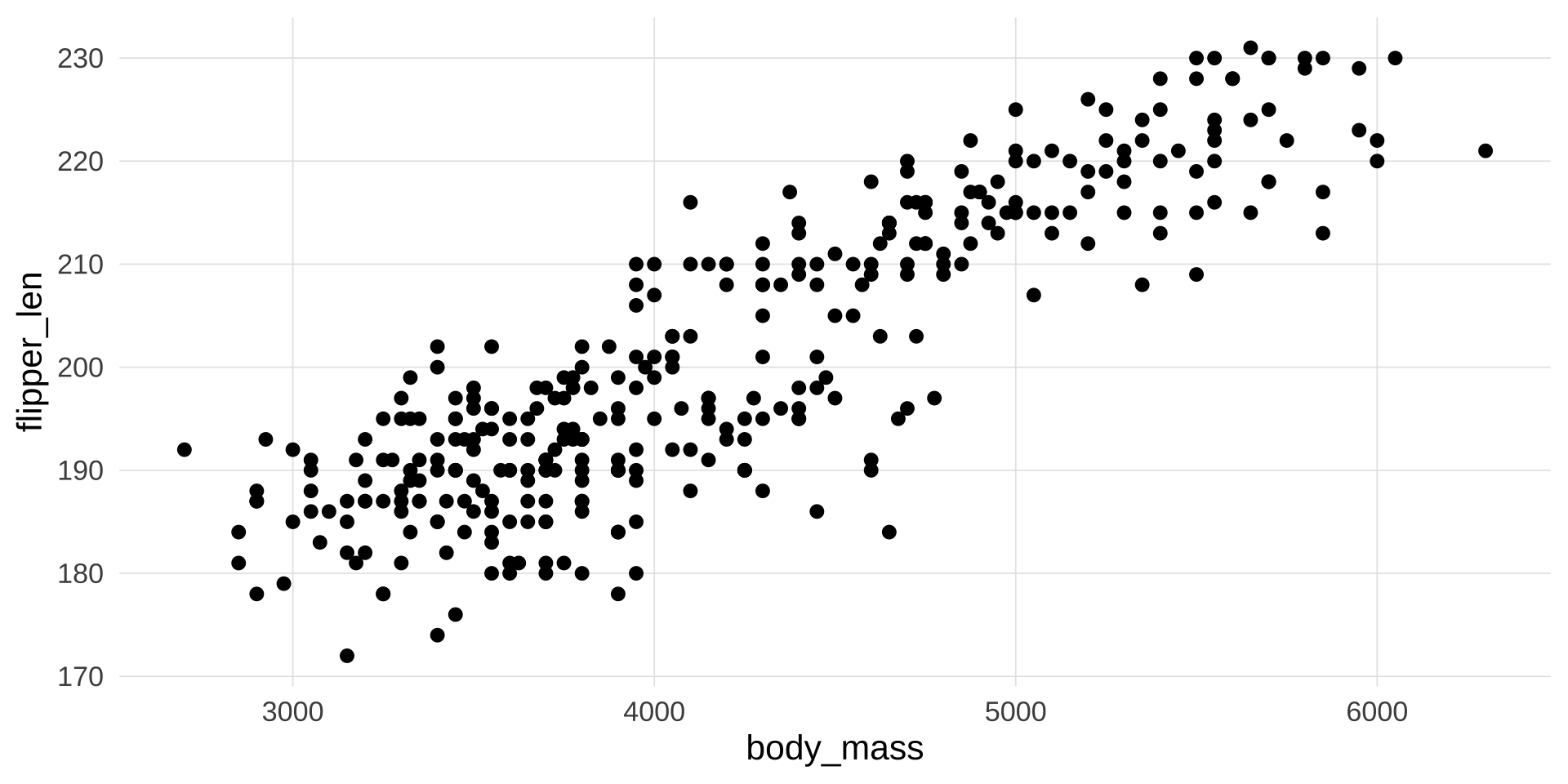
翻转坐标

▶️ 查看代码
penguins |> 
  ggplot(aes(x = flipper_len, 
             y = body_mass)) +
  geom_point() +
  coord_flip()

添加美感和层次感

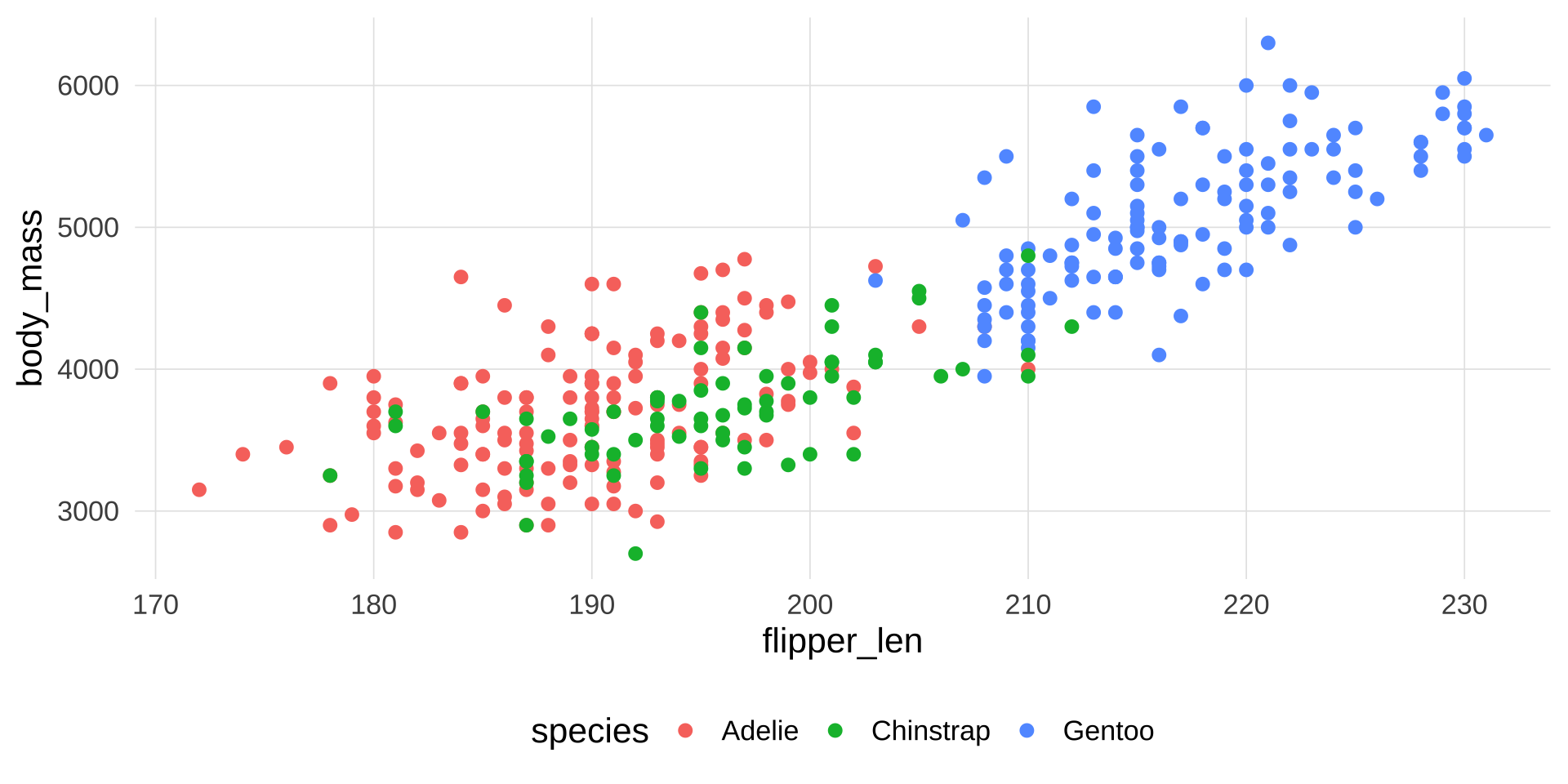
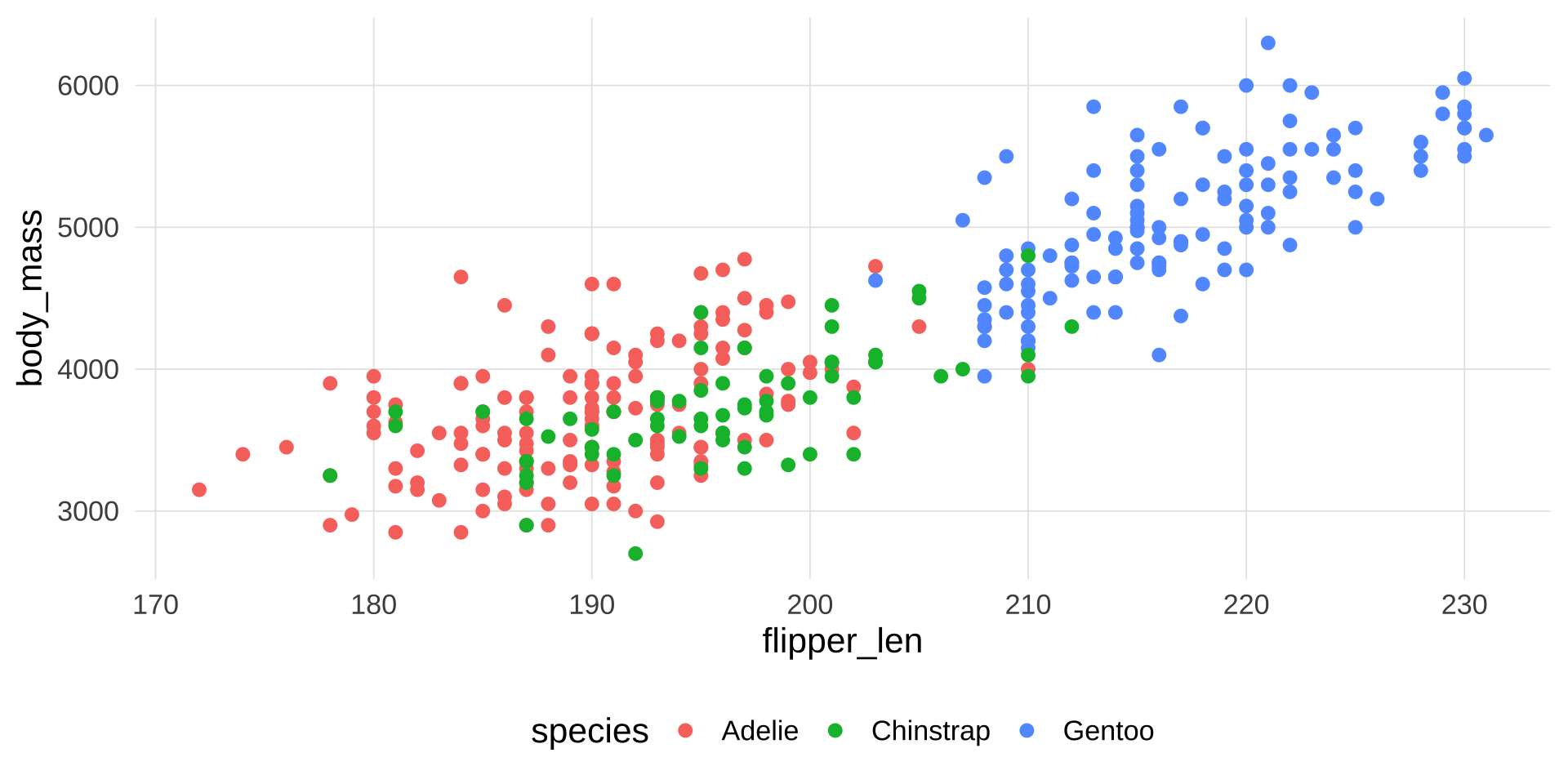
我们可以按类型给散点上色

▶️ 查看代码
penguins |> 
  ggplot(aes(x = flipper_len, 
             y = body_mass,
             color = species
             )) +
  geom_point()

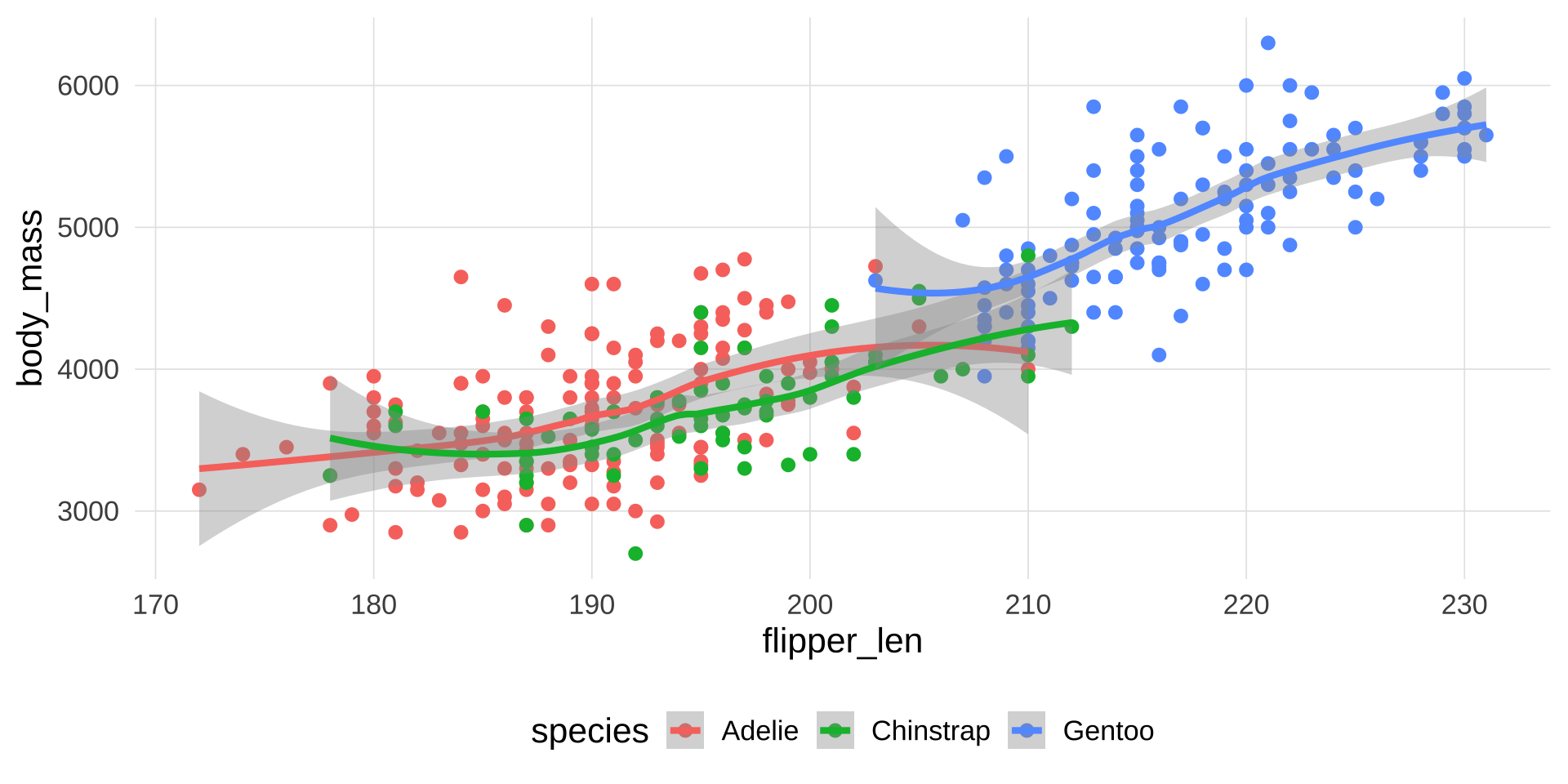
再添加一条趋势线

▶️ 查看代码
penguins |> 
  ggplot(aes(x = flipper_len, 
             y = body_mass,
             color = species
             )) +
  geom_point() +
  stat_smooth()

▶️ 查看代码
  geom_smooth(method = lm)
geom_smooth: na.rm = FALSE, orientation = NA, se = TRUE
stat_smooth: na.rm = FALSE, orientation = NA, se = TRUE, method = function (formula, data, subset, weights, na.action, method = "qr", model = TRUE, x = FALSE, y = FALSE, qr = TRUE, singular.ok = TRUE, contrasts = NULL, offset, ...) 
{
    ret.x <- x
    ret.y <- y
    cl <- match.call()
    mf <- match.call(expand.dots = FALSE)
    m <- match(c("formula", "data", "subset", "weights", "na.action", "offset"), names(mf), 0)
    mf <- mf[c(1, m)]
    mf$drop.unused.levels <- TRUE
    mf[[1]] <- quote(stats::model.frame)
    mf <- eval(mf, parent.frame())
    if (method == "model.frame") 
        return(mf)
    else if (method != "qr") 
        warning(gettextf("method = '%s' is not supported. Using 'qr'", method), domain = NA)
    mt <- attr(mf, "terms")
    y <- model.response(mf, "numeric")
    w <- as.vector(model.weights(mf))
    if (!is.null(w) && !is.numeric(w)) 
        stop("'weights' must be a numeric vector")
    offset <- model.offset(mf)
    mlm <- is.matrix(y)
    ny <- if (mlm) 
        nrow(y)
    else length(y)
    if (!is.null(offset)) {
        if (!mlm) 
            offset <- as.vector(offset)
        if (NROW(offset) != ny) 
            stop(gettextf("number of offsets is %d, should equal %d (number of observations)", NROW(offset), ny), domain = NA)
    }
    if (is.empty.model(mt)) {
        x <- NULL
        z <- list(coefficients = if (mlm) matrix(NA, 0, ncol(y)) else numeric(), residuals = y, fitted.values = 0 * y, weights = w, rank = 0, df.residual = if (!is.null(w)) sum(w != 0) else ny)
        if (!is.null(offset)) {
            z$fitted.values <- offset
            z$residuals <- y - offset
        }
    }
    else {
        x <- model.matrix(mt, mf, contrasts)
        z <- if (is.null(w)) 
            lm.fit(x, y, offset = offset, singular.ok = singular.ok, ...)
        else lm.wfit(x, y, w, offset = offset, singular.ok = singular.ok, ...)
    }
    class(z) <- c(if (mlm) "mlm", "lm")
    z$na.action <- attr(mf, "na.action")
    z$offset <- offset
    z$contrasts <- attr(x, "contrasts")
    z$xlevels <- .getXlevels(mt, mf)
    z$call <- cl
    z$terms <- mt
    if (model) 
        z$model <- mf
    if (ret.x) 
        z$x <- x
    if (ret.y) 
        z$y <- y
    if (!qr) 
        z$qr <- NULL
    z
}
position_identity 
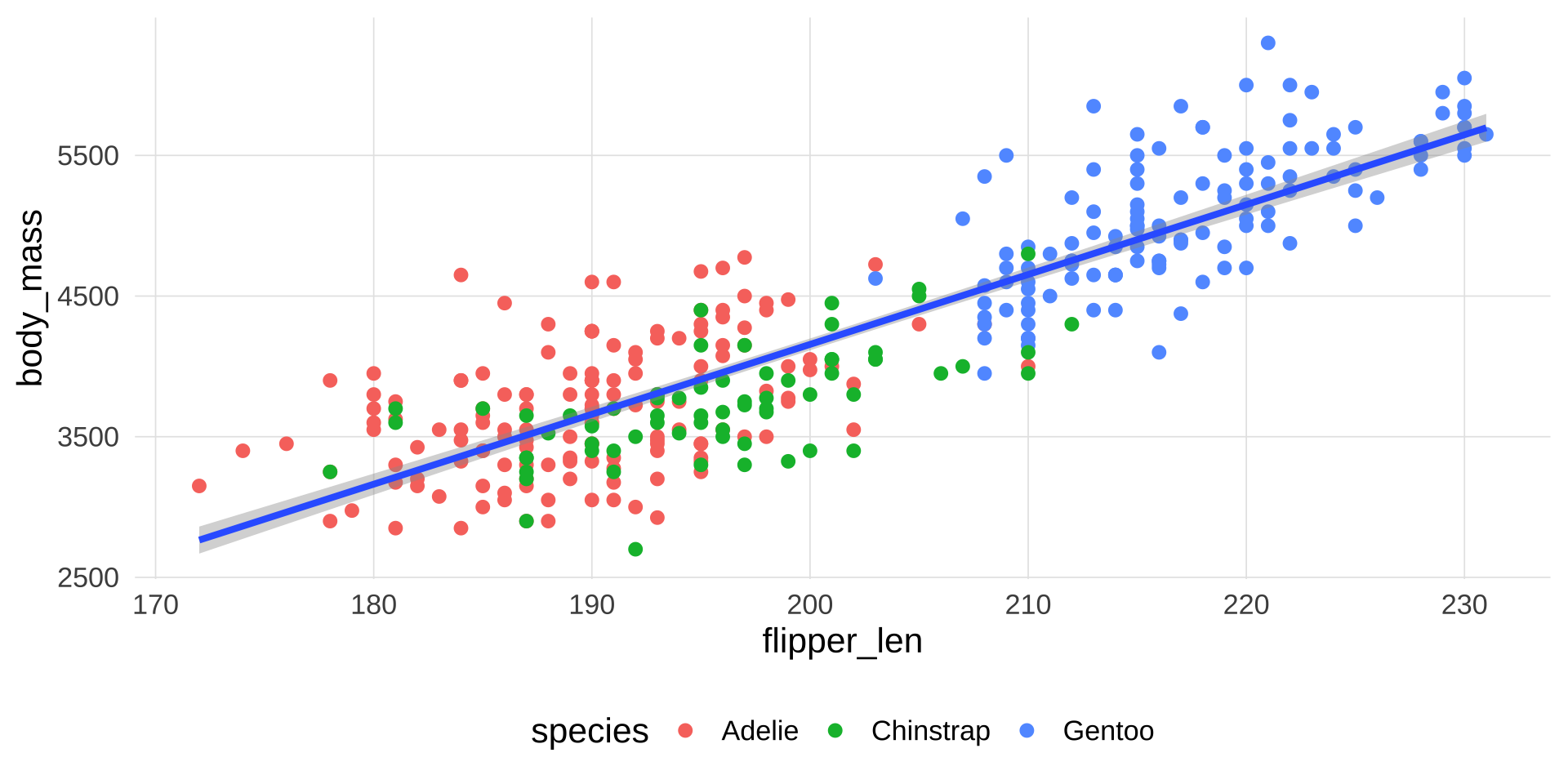
▶️ 查看代码
penguins |> 
  ggplot(aes(x = flipper_len, 
             y = body_mass
             )) +
  geom_point(aes(color = species)) +
  #stat_smooth()
  geom_smooth(method = lm)

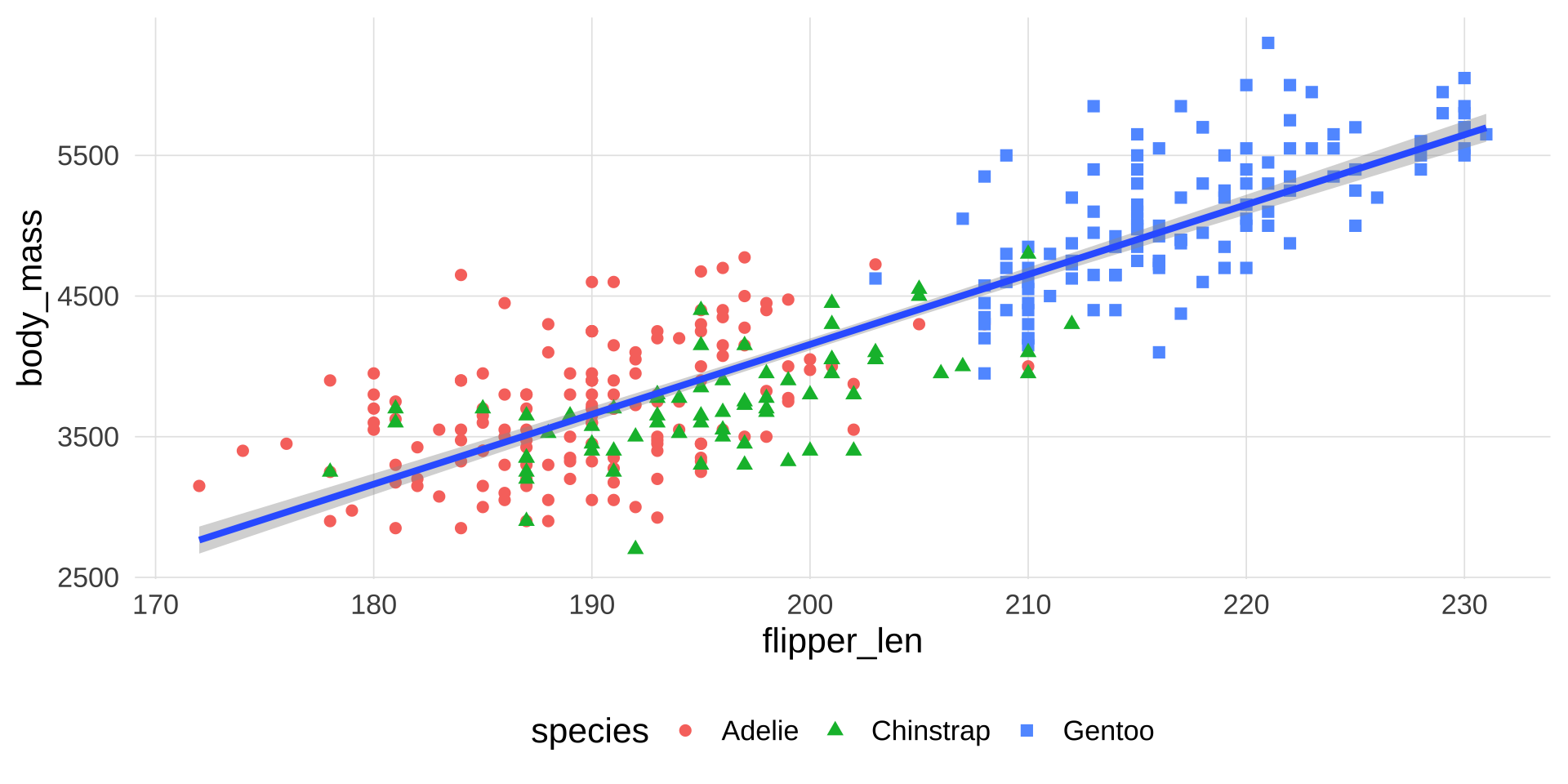
改变点的形状:让不同的类型用不同的形状显示

▶️ 查看代码
penguins |> 
  ggplot(aes(x = flipper_len, 
             y = body_mass
             )) +
  geom_point(aes(
    color = species,
    shape = species
    )) +
  geom_smooth(method = lm)

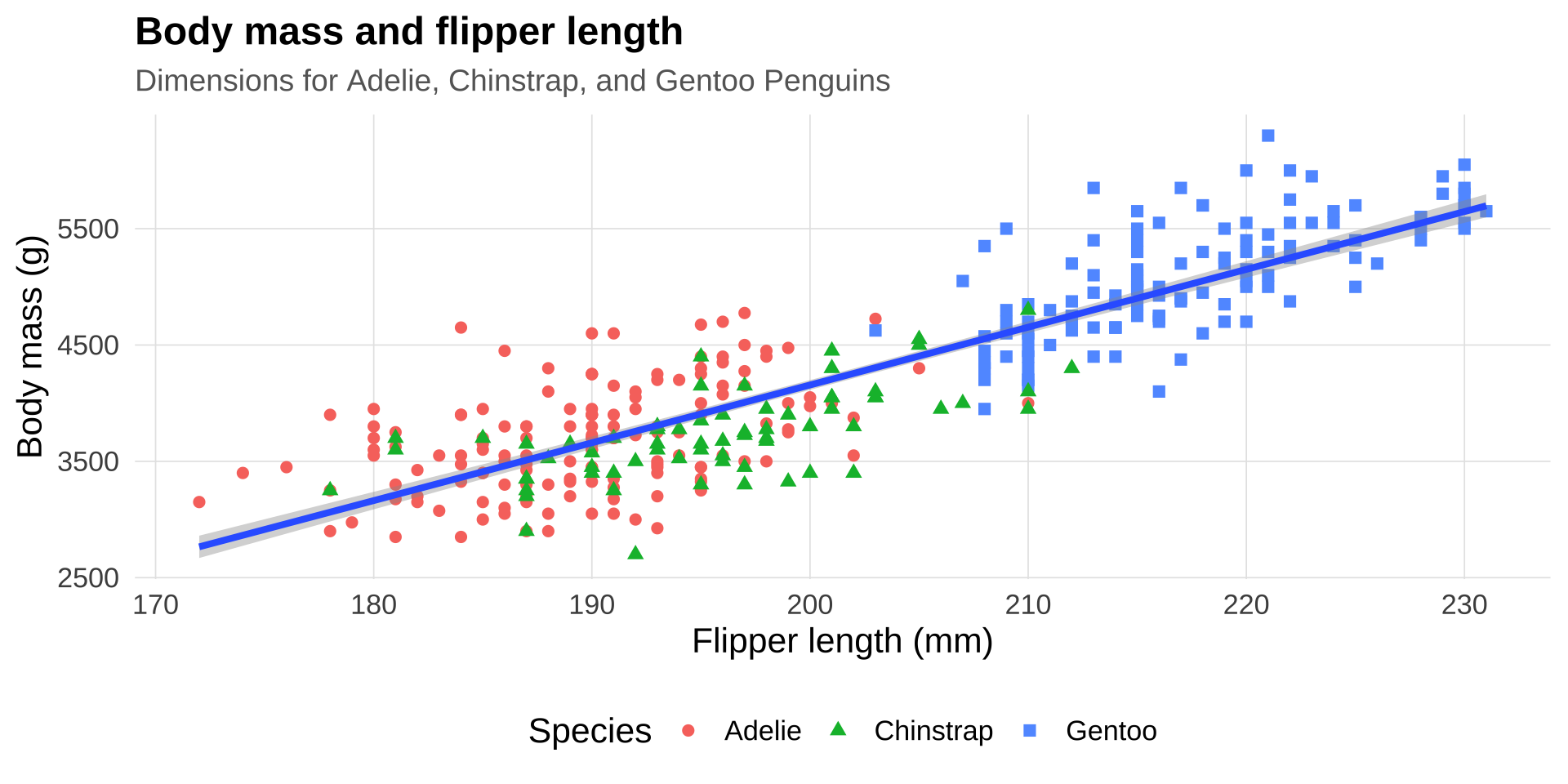
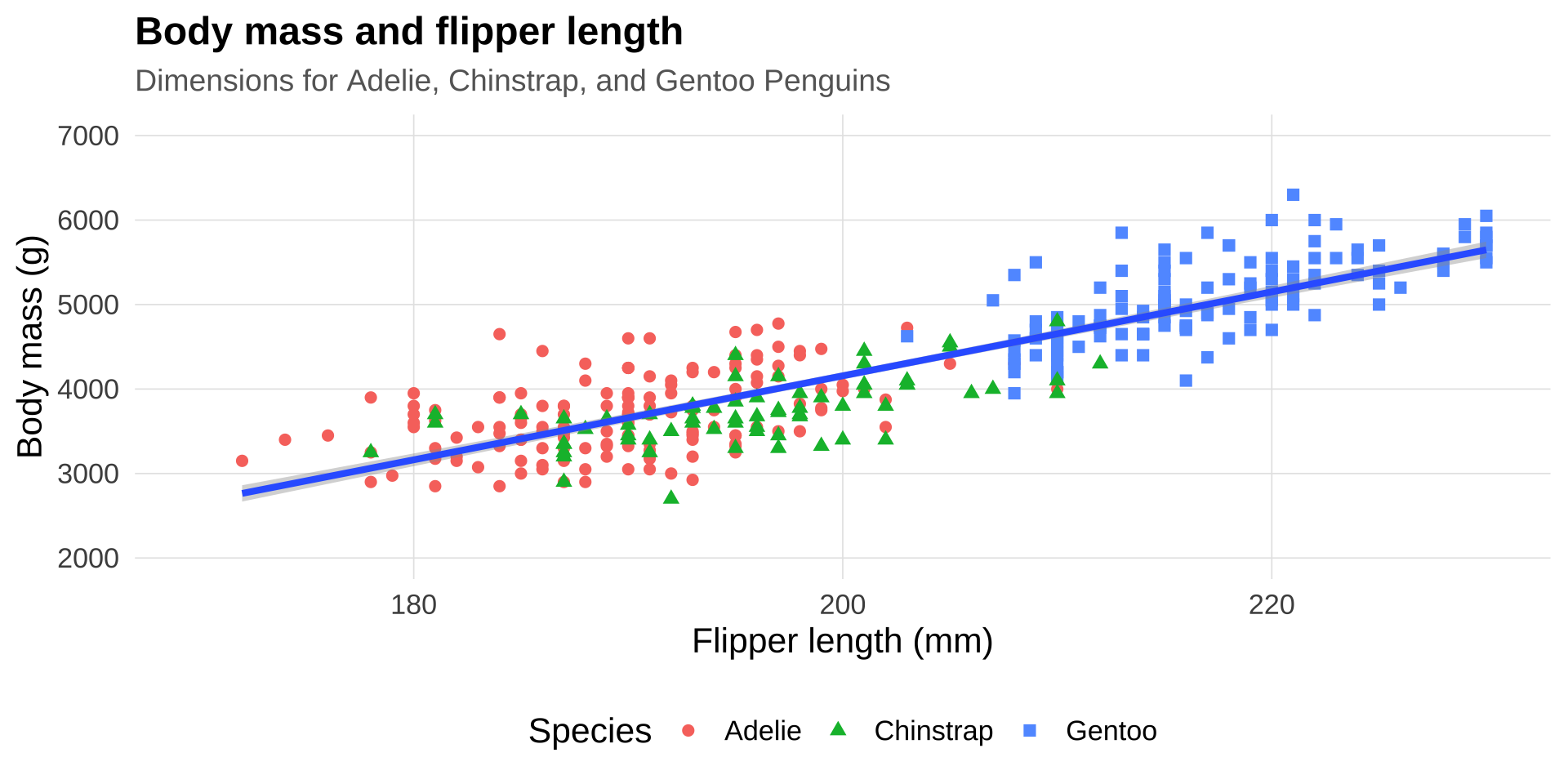
添加标签标题

▶️ 查看代码
penguins |> 
  ggplot(aes(x = flipper_len, 
             y = body_mass
             )) +
  geom_point(aes(
    color = species,
    shape = species
    )) +
  geom_smooth(method = lm) + 
   labs(
    title = "Body mass and flipper length",
    subtitle = "Dimensions for Adelie, Chinstrap, and Gentoo Penguins",
    x = "Flipper length (mm)", y = "Body mass (g)",
    color = "Species", shape = "Species"
  )
调节坐标轴

▶️ 查看代码
penguins |> 
  ggplot(aes(x = flipper_len, 
             y = body_mass
             )) +
  geom_point(aes(
    color = species,
    shape = species
    )) +
  geom_smooth(method = lm) + 
   labs(
    title = "Body mass and flipper length",
    subtitle = "Dimensions for Adelie, Chinstrap, and Gentoo Penguins",
    x = "Flipper length (mm)", y = "Body mass (g)",
    color = "Species", shape = "Species"
  ) + 
  xlim(170, 230) + 
  ylim(2000, 7000)
▶️ 查看代码
  # scale_y_continuous(limits = c(2000, 7000)) +
  # scale_x_continuous(limits = c(170, 230))

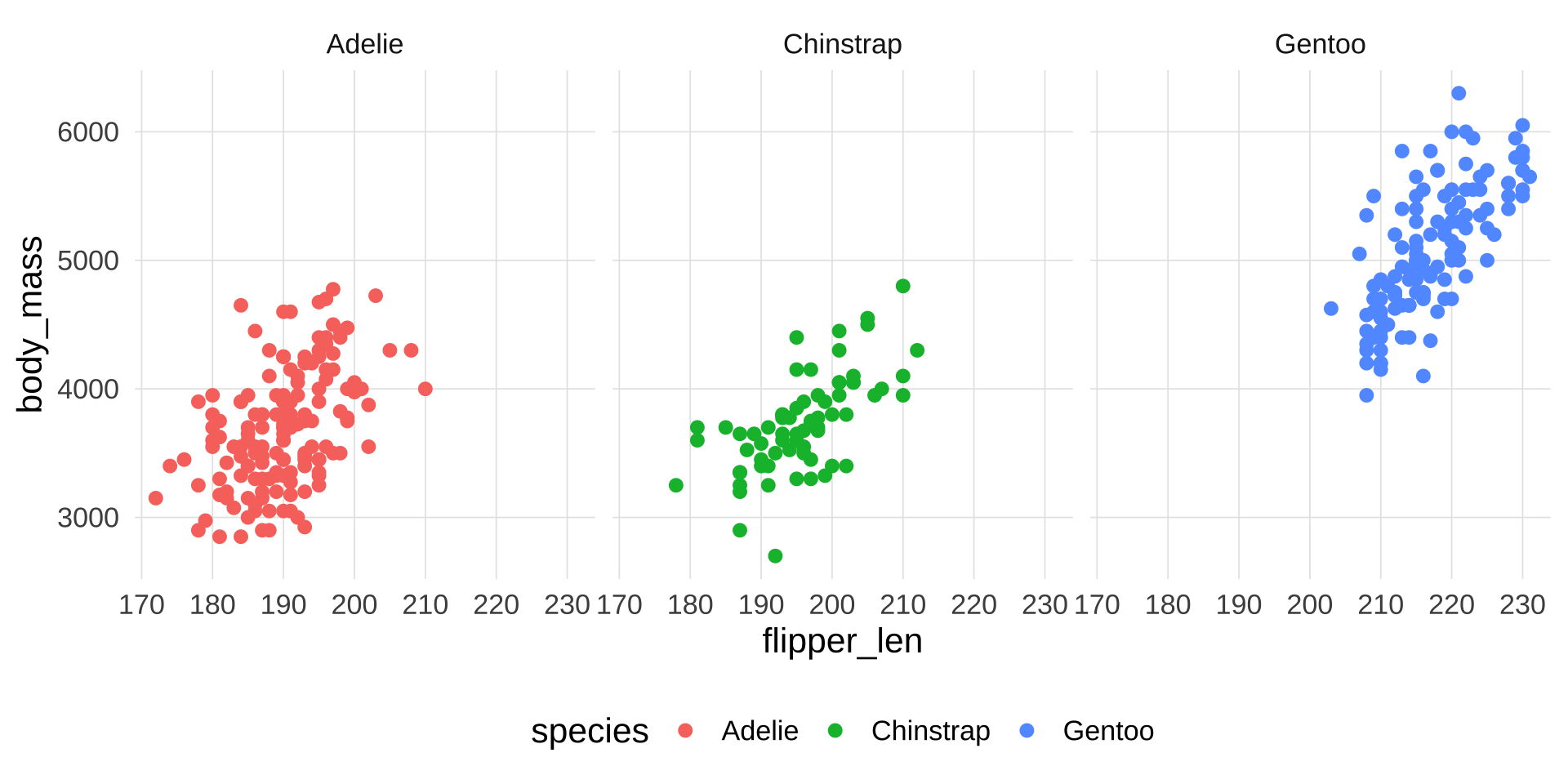
分面进阶

▶️ 查看代码
penguins |> 
  ggplot(aes(x = flipper_len, 
             y = body_mass,
             color = species
             )) +
  geom_point() +
  facet_wrap(~ species)

配色系统

scale_color_*() / scale_fill_*() 体系

两套颜色通道

ggplot2 有两套颜色通道,使用时要选对:

通道 参数 控制的是
color scale_color_*() 点、线、箱线图边框的颜色
fill scale_fill_*() 柱状图、箱线图、小提琴图的填充色

color

▶️ 查看代码
penguins |> 
  ggplot(aes(x = flipper_len, 
             y = body_mass,
             color = species
             )) +
  geom_point()

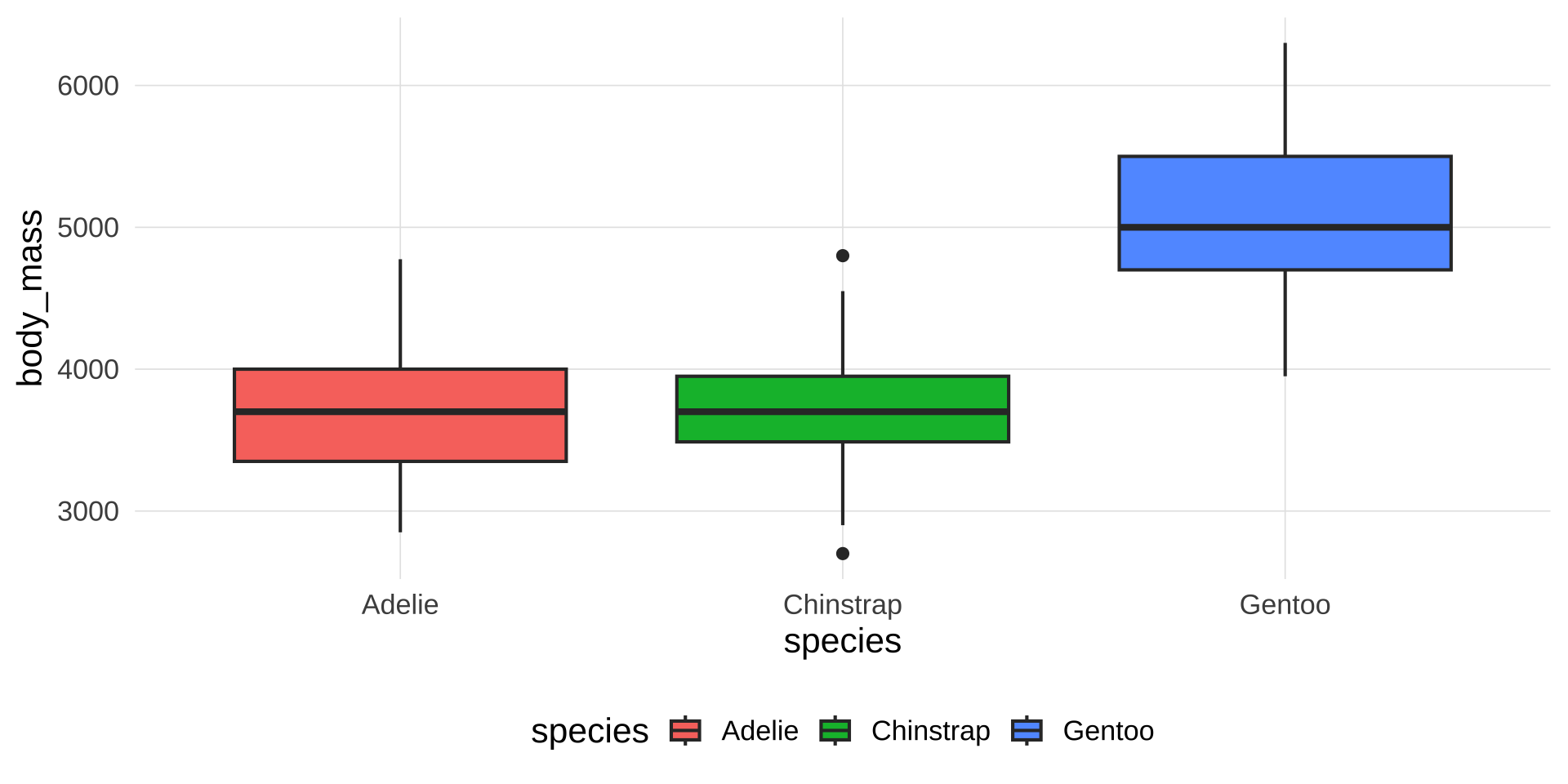
fill

▶️ 查看代码
# 改变箱体的填充颜色
penguins |> 
  ggplot(aes(x = species, 
             y = body_mass, 
             fill = species)) +
  geom_boxplot()

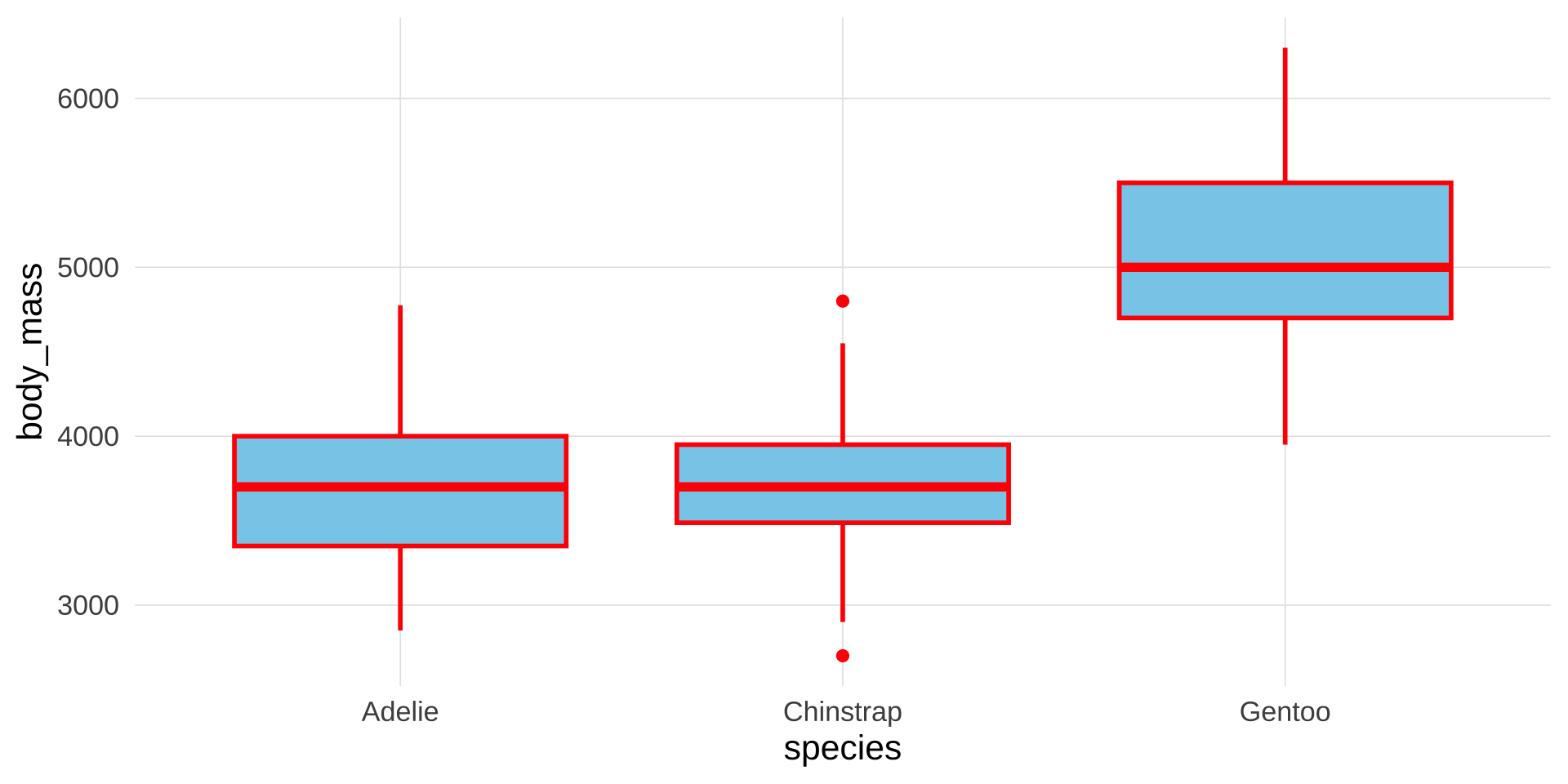
color + fill

▶️ 查看代码
penguins |> 
  ggplot(aes(
    x = species, 
    y = body_mass)
         ) +
  geom_boxplot(
    fill = "skyblue",   # 内部填充蓝色
    color = "red", # 轮廓线红色
    linewidth = 1       # 加粗轮廓看效果
  )

多图并列

patchwork 拼图

为什么需要多图并列?

分面(facet)是同一张图内按变量分组——所有子图使用相同的几何对象和映射

当你需要把完全不同类型的图放在一起时(比如左边条形图、右边散点图),就需要多图并列工具。
提示

patchwork 包让多图拼接变得极为简洁——核心操作符就是 +/|

patchwork:安装与基本语法

▶️ 查看代码
install.packages("patchwork")
library(patchwork)

三个核心操作符:

操作符 含义
p1 + p2 并排(左右)
p1 / p2 上下堆叠
p1 | p2 并排(等价于 +,语义更清晰)
▶️ 查看代码
# 先把每张图存为变量
p1 <- ggplot(...) + geom_...()
p2 <- ggplot(...) + geom_...()

# 再拼合
p1 + p2          # 左右并排
p1 / p2          # 上下堆叠
(p1 + p2) / p3   # 上两下一

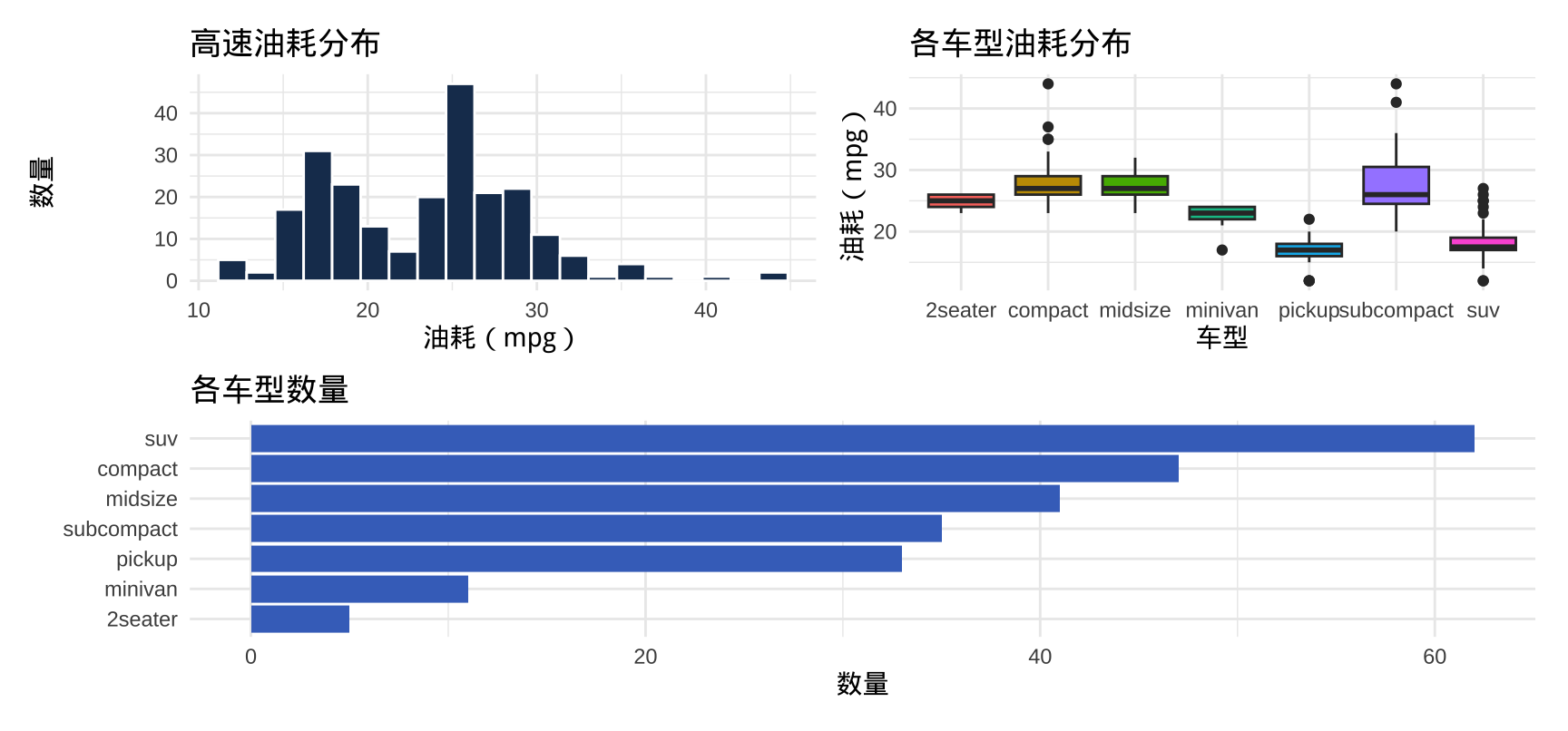
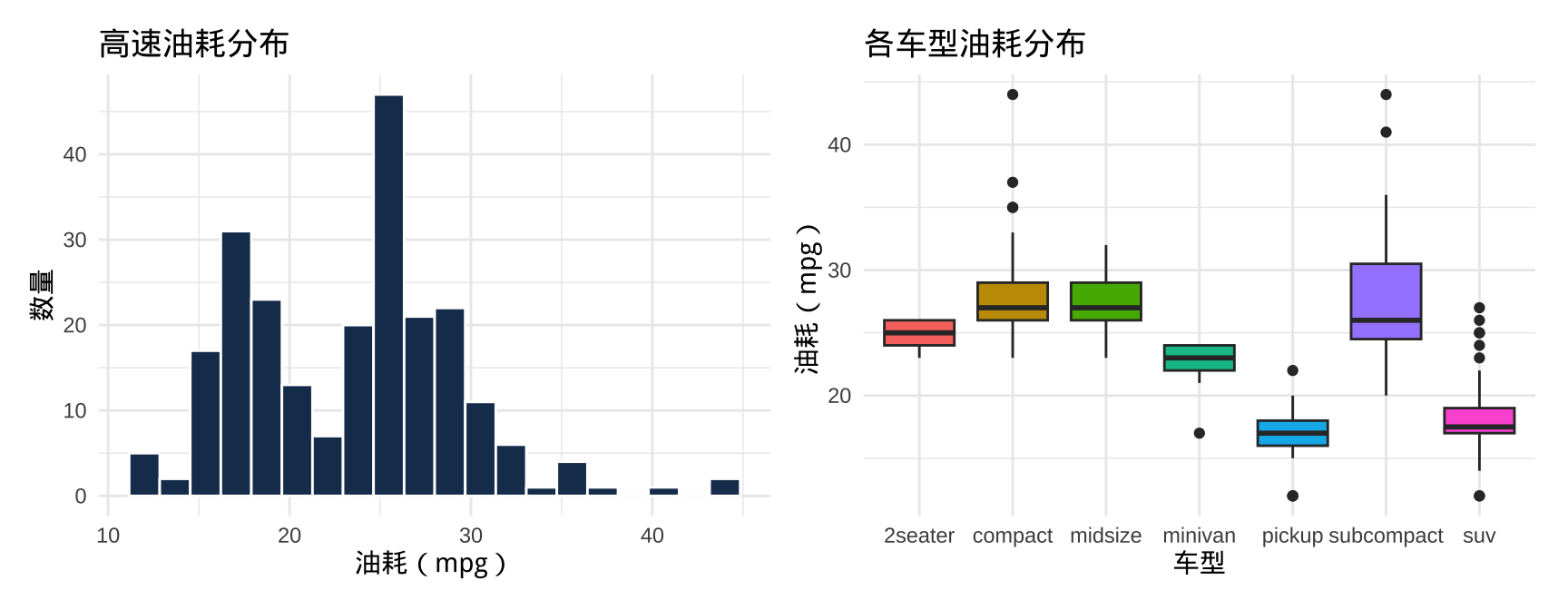
左右并排:+|

▶️ 查看代码
p1 <- ggplot(mpg, aes(x = hwy)) +
  geom_histogram(bins = 20, fill = "#1a3a5c", color = "white") +
  labs(title = "高速油耗分布", x = "油耗(mpg)", y = "数量") +
  theme_minimal(base_size = 11)

p2 <- ggplot(mpg, aes(x = class, y = hwy, fill = class)) +
  geom_boxplot(show.legend = FALSE) +
  labs(title = "各车型油耗分布", x = "车型", y = "油耗(mpg)") +
  theme_minimal(base_size = 11)

p1 + p2    # 或 p1 | p2
上下堆叠:/
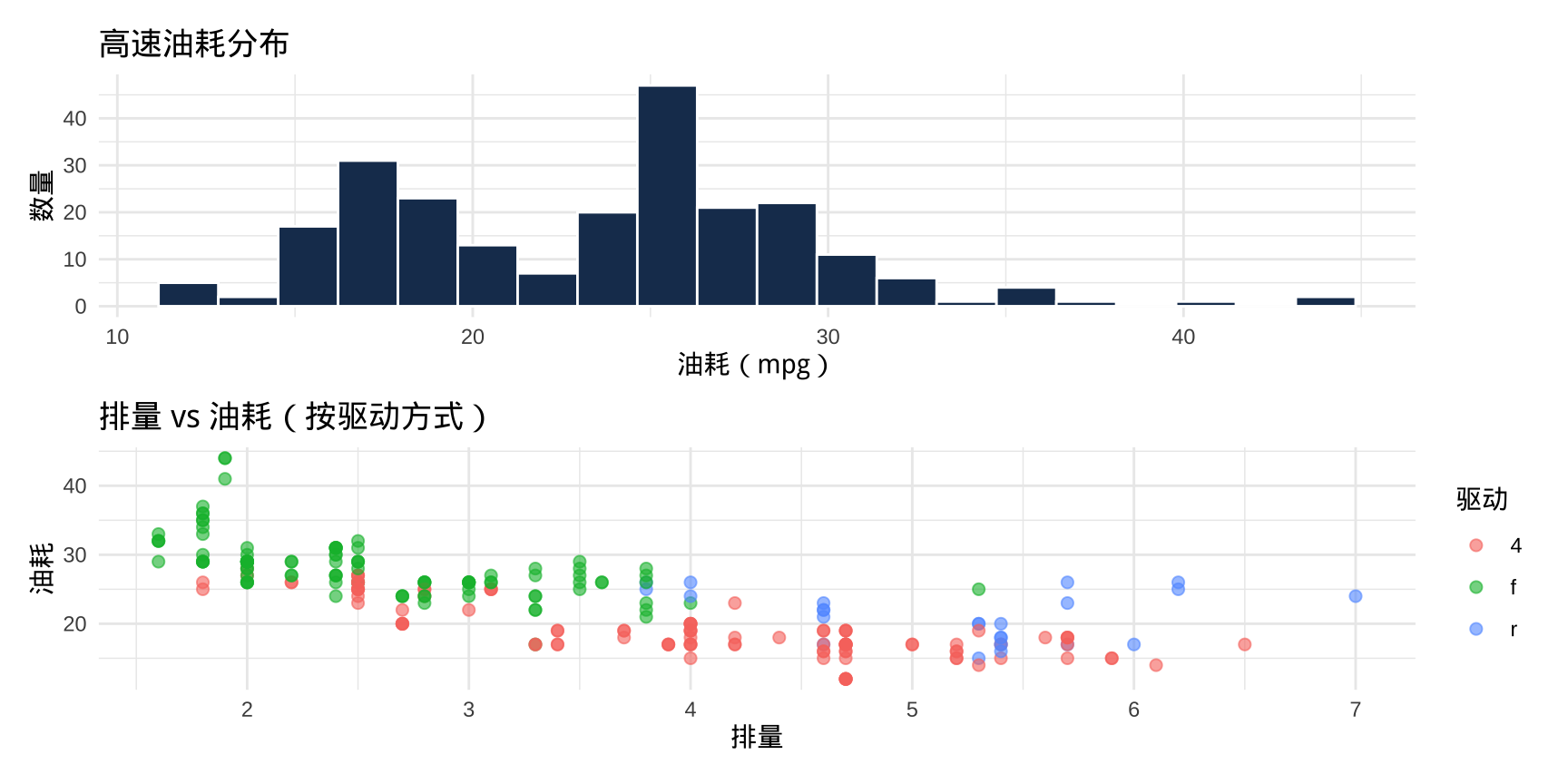
▶️ 查看代码
p3 <- ggplot(mpg, aes(x = displ, y = hwy, color = drv)) +
  geom_point(alpha = 0.6, size = 2) +
  labs(title = "排量 vs 油耗(按驱动方式)",
       x = "排量", y = "油耗", color = "驱动") +
  theme_minimal(base_size = 11)

p1 / p3    # p1 在上,p3 在下

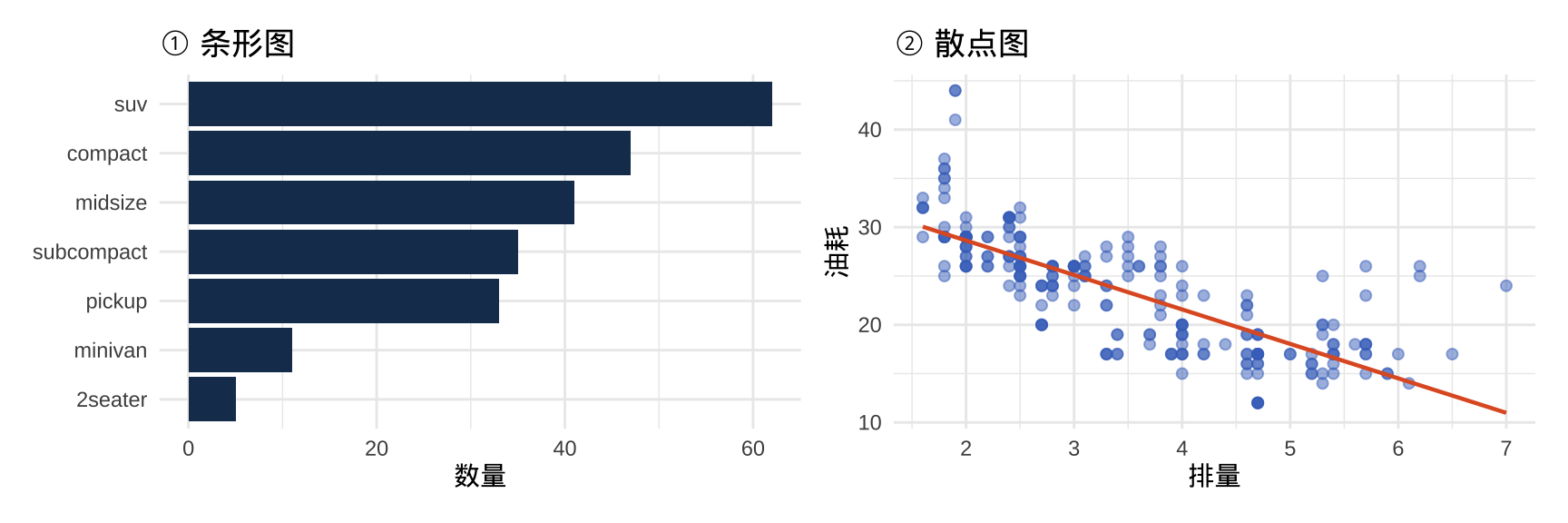
混合布局

括号用来控制优先级,实现"上两下一"或"左一右两"等布局:

▶️ 查看代码
p4 <- mpg |>
  count(class, sort = TRUE) |>
  ggplot(aes(x = n, y = reorder(class, n))) +
  geom_col(fill = "#4472C4") +
  labs(title = "各车型数量", x = "数量", y = NULL) +
  theme_minimal(base_size = 11)

# 上方两图并排,下方一图占满宽度
(p1 + p2) / p4

图形保存

ggsave() 与分辨率控制

ggsave():保存图形

▶️ 查看代码
# 最简用法:保存最后一张图
ggsave("my_plot.png")

# 指定图形对象、尺寸、分辨率
p <- ggplot(mpg, aes(x = displ, y = hwy)) +
  geom_point() +
  labs(title = "排量与油耗")

ggsave(
  filename = "plot_output.png",
  plot     = p
)

提示

ggsave() 根据文件扩展名自动选择格式:.png.pdf.svg.jpg.tiff 均支持。

本讲小结

  • 分面进阶facet_wrap()nrow/ncol 控制布局、scales 参数放开坐标轴、labeller 自定义标签;facet_grid() 适合行列意义明确的矩阵分面

  • 多图并列(patchwork)+ 左右并排、/ 上下堆叠、(p1 + p2) / p3 复杂布局;plot_annotation() 统一标题与自动编号;plot_layout() 控制宽高比例

  • 配色系统scale_*_manual() 手动指定;scale_*_brewer() 预设调色板(分类用 Set2/Dark2,有序用序列色板);scale_*_viridis_c() 连续变量首选(色盲友好)

  • 坐标轴精调coord_cartesian() 缩放视图(不删除数据);scales::percent/dollar/comma 格式化标签;scale_x_log10() 对数轴处理跨数量级数据

  • 图形保存ggsave() 指定 width/height/dpi;学术投稿用 .tiff(300 dpi)或 .pdf(矢量);中文字体用 showtext 包解决

课后练习

基础练习(必做)

  1. 使用 mpg 数据,绘制 cty(城市油耗)的直方图,用 facet_wrap()drv 分面,要求:(a)每组使用独立的 y 轴范围;(b)将 "4"/"f"/"r" 替换为中文标签
  2. 使用 diamonds 数据,用 patchwork 并列展示:左图为各 cut 的计数条形图,右图为 price 的密度图(按 cut 上色),整体添加标题和 A/B 编号
  3. 重绘 mpg 散点图(displ vs hwy),要求:(a)y 轴添加单位"英里/加仑";(b)用 geom_hline() 标注整体均值;(c)用 annotate() 在图中标注均值数值

进阶挑战(选做)

  1. 使用 mtcars 数据,绘制所有车型的散点图(wt vs mpg),用 ggrepel::geom_text_repel() 给每个点标注车名,用 color 映射 cyl(气缸数),并用 scale_color_viridis_d() 配色
  2. 使用 diamonds 数据,绘制价格(price)对克拉数(carat)的散点图:x/y 轴均用 log10 对数坐标轴,按 cut 分面,并为每个分面添加线性趋势线。思考:对数坐标下线性趋势意味着什么?

下讲预告

第9讲:线性回归

谢谢!

第8讲:数据可视化(下)


「好的图形不是画出来的,而是选出来的——从数十种可能的呈现方式中,选出那个最能说明问题的那一种。」